
How to Rob Stores in GTA 6 and Walk Out Clean
Robbery steps, security levels, alarms, cameras, the Snap Gun and random safe codes come from GameSpot, Tech4Gamers, GTA6Heists and PC Gamer, checked November 22, 2026. We have not run every robbery ourselves. Gameplay in the video and images is CC BY footage from How to Everything. Chapter numbers only; no story spoilers.
Quick answer
Check the store's security level on the map, aim at the clerk for the Threaten prompt, shoot out the cameras, and disarm the white alarm panel in the back. Safe codes are random every robbery, so use Focus (L3 + R3) to find staff who know it, then threaten them or look for notes. Destroy the camera footage, change your look, and skip banks and loan stores until Chapter 3.
On this page 6
Screenshots from our own playthrough get added here as we play.
Store robberies are one of the main ways to make money in GTA 6, and you can do them from the start. The catch: cameras, alarms and safe codes all work differently than you'd expect. Here's how to do it clean. (No story spoilers.) The matching Short, How to Rob Stores in GTA 6 and Walk Out Clean, is embedded at the top of this page. For the full step-by-step, see our GTA 6 store robbery guide.
Before you go in
- Check the map. Every business shows a security level: Low, Medium or High. Most small shops in the starting area are Low. Medium and High places are much easier with both Jason and Lucia (GameSpot).
- Open the map inside to see the floor plan, including back doors and side entrances (GameSpot).
Inside the store
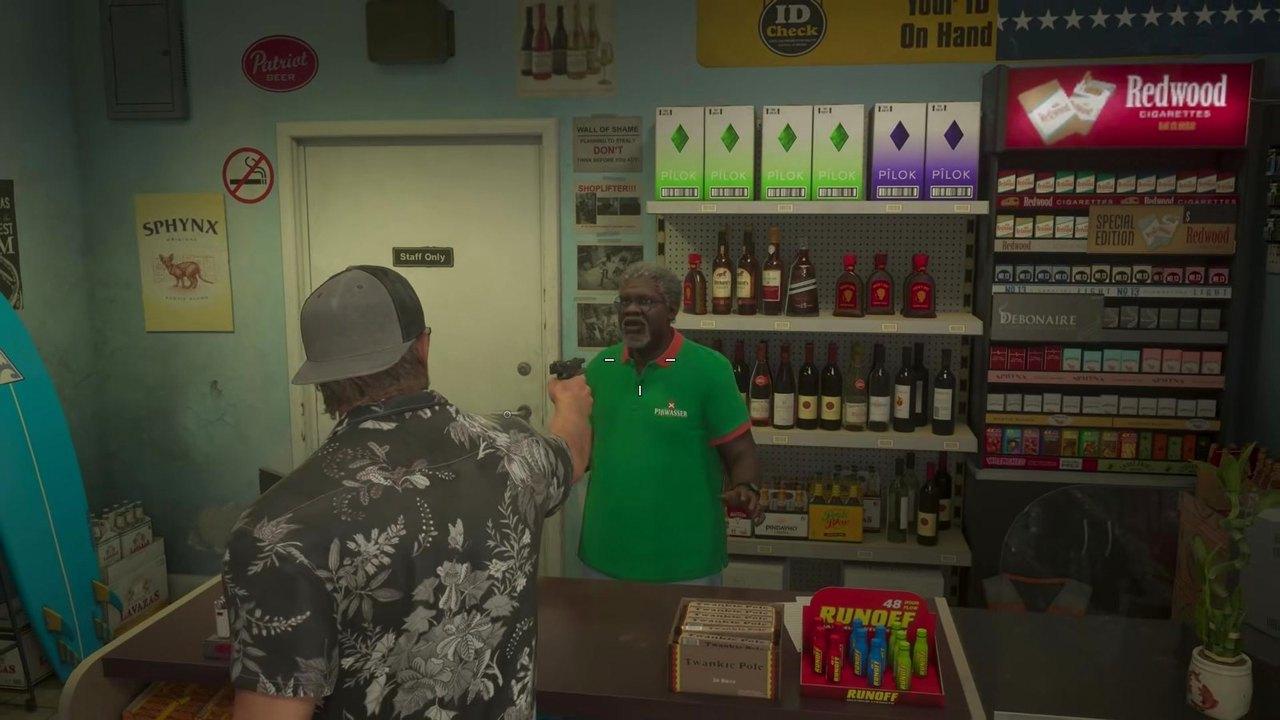
- Aim at the clerk. You get the Threaten prompt. The clerk empties the register, or you can knock them out and grab the cash yourself (GameSpot).
- Shoot out the cameras before they spot you. Focus mode (click both sticks) highlights them. A silenced gun keeps it quiet (GameSpot).
- Kill the alarm. It's a white panel on the wall, usually in the back room, and Focus highlights it (GameSpot). Breaking a door down or smashing displays can set it off.
- Get into the back room quietly. Kicking the door can trip the alarm. The Snap Gun, unlocked by progressing the story, opens locks without setting it off (GameSpot, Tech4Gamers).
Safe codes are random
Safe codes in free-roam robberies change every time, even if you rob the same store twice. So code lists online won't open your safe (GameSpot, Tech4Gamers, GTA6Heists).
- Use Focus (L3 + R3) to see which staff members may know the code. The game even tells you this during a hold-up.
- Threaten them for it. If one won't talk, try another (Tech4Gamers).
- Look around: sticky notes, computer screens, back-room notes, or a guard you take down (Tech4Gamers, GTA6Heists).
- No code? Small safes can be picked and lockboxes snapped open; an explosive opens the rest but destroys some of the cash (GameSpot, Tech4Gamers).
Getting out
- Caught on camera? Destroy the footage before you leave. If you don't, the police can identify you (GameSpot).
- Change your look. Swap clothes or accessories and your appearance heat clears. Then put distance between you and the store (GameSpot).
- Skip banks and loan stores early. Their marked bills carry dye packs, and you can't jam those until Chapter 3 (GameSpot).
Store tills pay a few hundred at a time. If you want a bigger early pickup, one warehouse east of Hamlet holds about $13,000 in loot — with a catch on how you cash it. Focus for safe codes, shooting the cameras, and clearing appearance heat are also in our 50 GTA 6 features list. If a stuck Wanted Level was trapping you after a job, GTA 6's first update fixed that. After a big take, save the game yourself.
Want more? Check out gta6cheatshq.com for more GTA 6 strategy tips, and join our Discord for early access to our roleplay server.
Sources: GameSpot — GTA 6 Safe Codes And Robberies Guide; Tech4Gamers — How to Find Safe Codes; GTA6Heists — Safe Codes; PC Gamer — GTA 6 safe codes; GameSpot — GTA 6 Tips.
Video gameplay and images: How to Everything (CC BY).
Unofficial fan site, not affiliated with Rockstar Games or Take-Two Interactive.
FAQ
- Are GTA 6 safe codes the same every time?
- No. GameSpot, Tech4Gamers and GTA6Heists all report that free-roam safe codes change every robbery, even at the same store. Use Focus to find staff who may know the code, or look for notes and screens.
- How do you stop the alarm when robbing a store in GTA 6?
- Find the white alarm panel, usually in the back room, and disable it. Focus mode highlights it. Kicking doors or smashing displays can set it off, and the Snap Gun opens locks quietly once the story unlocks it.
Related guides
- How to rob stores in GTA 6 without the cops showing up
- GTA 6 Cops Never Forget You… Unless You Do This
- That Viral GTA 6 Money Glitch Isn't Real — Do This Instead
- GTA 6 Early Money: The $13,000 Warehouse East of Hamlet (And How to Actually Cash It)
- 50 GTA 6 Features I Found in 5 Days (The Game Never Explains These)
- GTA 6 Update 1.002.002: Every Fix in the First Patch (And the One Thing to Do Yourself)
Sources
- GTA 6 News Daily: How to Rob Stores in GTA 6 and Walk Out Clean
- GameSpot: GTA 6 Safe Codes And Robberies Guide
- Tech4Gamers: How to Find Safe Codes
- GTA6Heists: Safe Codes
- PC Gamer: GTA 6 safe codes
- GameSpot: GTA 6 Tips: Everything I Wish I Knew Before I Started Playing
- How to Everything: Top 10 HEIST/ROBBERY LOCATIONS In GTA 6 (video gameplay and images, CC BY)
GTA 6 Cheats HQ Discord
Join the Crew
Day-one help, cheat codes, mission questions, and spoiler-tagged channels so nobody ruins the story for you. Find something in-game? Post it there and we will test it before it goes on the site.